


 Cover image via
Follow us on Instagram, TikTok, and WhatsApp for the latest stories and breaking news.
Spotify is rolling out a new in-app feature called Messages, letting you share music and podcasts directly with friends
While users could already share content via other apps, Spotify's new one-to-one direct messaging function, launching this week, lets you send recommendations directly within the platform.
The feature will be available on mobile devices for users aged 16 and above in select markets.
To share a song, podcast, or audiobook, simply start a one-on-one conversation with someone you've previously interacted with on Spotify.
The app will now also suggest people you might want to message based on your past interactions
This applies if you've joined a Jam session, created a Blend or a Collaborative Playlist together, or if you're part of the same Family or Duo plan.
This makes it easier to share recommendations and chat about what you're listening to, all in one place.
As with other messaging platforms, Spotify users have the choice to accept or reject message requests and even block specific accounts from messaging them
The company emphasises that its Terms of Use and Platform Rules against illegal and harmful content still apply to the Messages feature. If something doesn't feel right, you can easily report that content or account.
To ensure user safety, Spotify said it uses "proactive detection technology to scan messages for certain unlawful and harmful content", and its moderators will review reported content.
Messages on Spotify also use "industry-standard encryption" to protect your data both in transit and at rest. This means your conversations are protected by encryption when they are stored and when they are on the move.
Here's how you can use the new feature:
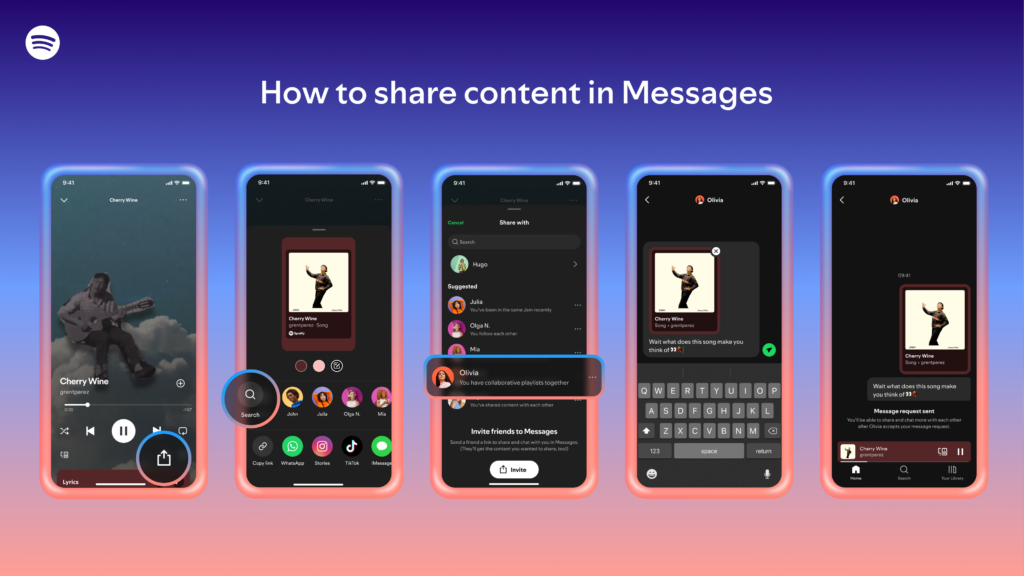
- When you're listening to a song, podcast, or audiobook, tap the share icon in the "Now Playing" view
- Select a friend you want to share it with
- Tap send
After your friend accepts your message request, you'll be able to react with emojis, send text, and share content back and forth.
To access your messages, just tap your profile photo in the top left corner of the app.
